
The plugin workshop
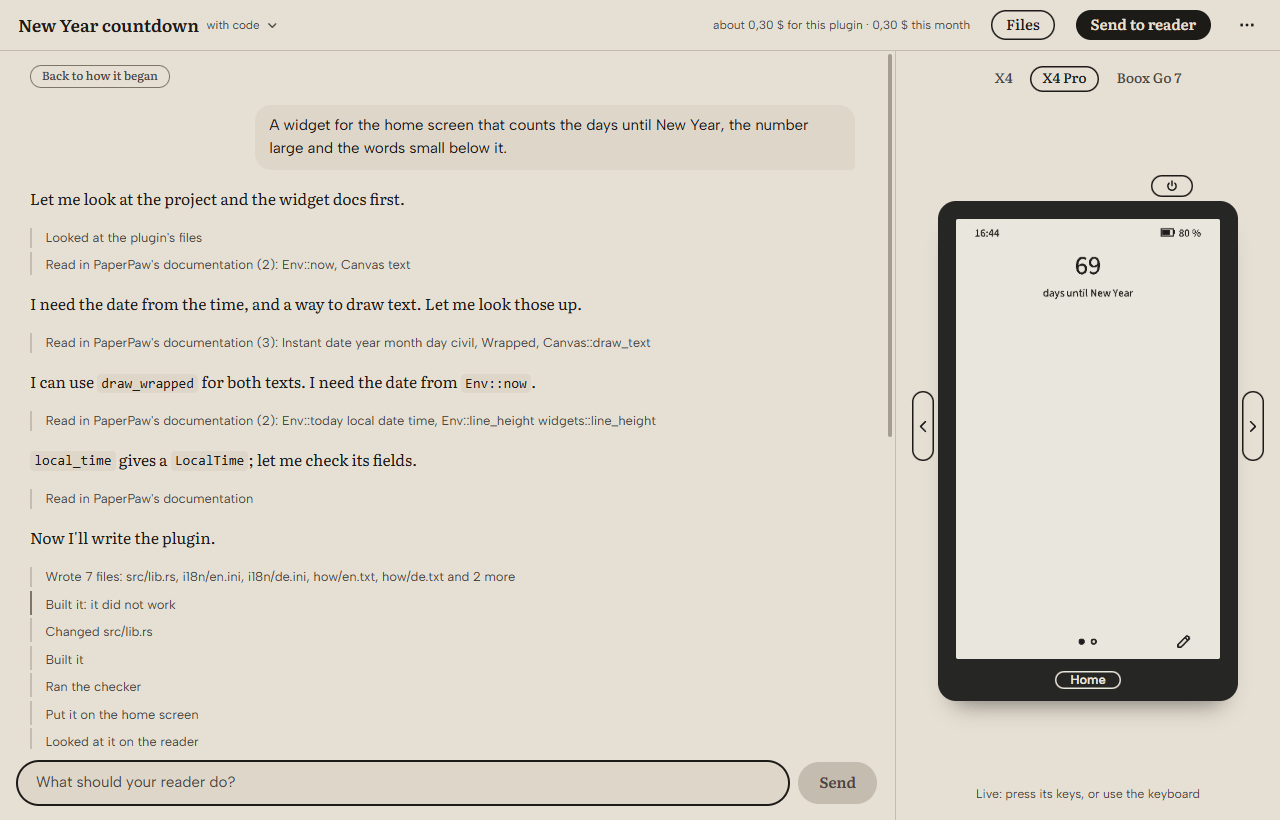
Make your own plugins for your reader by saying what you want. The workshop writes the plugin, tries it on an emulated reader and checks it as PaperPaw checks plugins.
Version 0.1.0-beta.8, 21.1 MB Beta · All releases
What it does
- Describe it. A look, a home screen, a widget, a tool: say it in your own words, and change it the same way.
- Try it. The plugin runs on an emulated X4, X4 Pro or Boox Go 7 beside the conversation, drawn by PaperPaw itself, with the device's keys. The workshop checks it on every reader and in every language it has.
- Send it. Onto your reader over Wi-Fi, over the USB cable, or onto its card.
- Publish it. Pack it for the plugin library, where others find it. The workshop makes one file and opens the upload form; you choose the file there and send it.
Your key, your computer
You bring your own Claude key and pay Anthropic for what you use; the workshop shows what each turn costs. The key stays in your computer's keychain, and with it the workshop talks to Anthropic directly. The workshop runs on your computer, and your plugins are folders on your computer.
Or a PaperPaw key
Without a Claude key of your own, you can ask for a PaperPaw key with your account of the plugin store: PaperPaw then pays for the workshop's requests. PaperPaw likes best to help with plugins shared with everyone in the store.
With a PaperPaw key, the workshop sends its requests to the model through PaperPaw's server (workshop.paperpaw.org), which passes them on to Anthropic and counts what the key used this month. Only those requests go through it. The server keeps nothing of them or of the answers, and your projects stay on your computer. Privacy
What you need
- Windows 10 or 11. Versions for macOS and Linux come later.
- A Claude key, or a PaperPaw key. Claude Console
- For plugins with code, which are built for the X4 for now: about 1 GB of room for Rust and the builds, and Microsoft's C++ build tools (about 3 GB; the workshop offers to install them). The workshop sets up Rust by itself the first time.
First steps
- Download the installer and run it. Windows may ask whether you trust it: the installer is not signed with a certificate yet.
- Paste your Claude key when the workshop starts.
- Say what your reader should do, such as "A calm dark look for reading at night".
- When it looks right, choose Send to reader. Or choose Publish in the menu and upload its one file to the plugin library. Publish a plugin
The workshop is open source, under the Apache License 2.0. Its source